Pause.
Your phone, on your terms.
Block distracting apps, limit daily use, and decide when access returns. Make room for what you meant to do.
Free on iPhone. No account required.
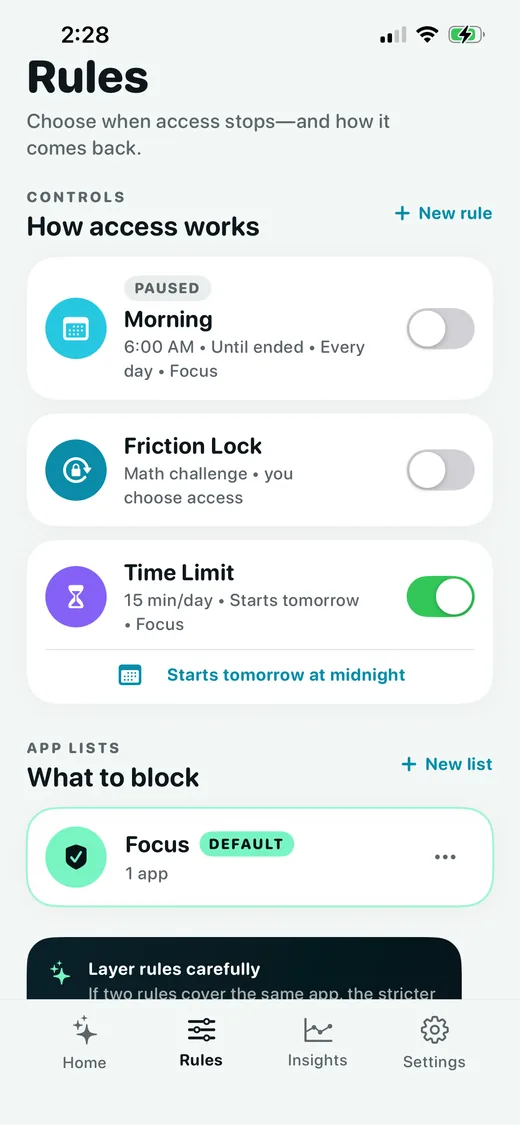
A strict app blocker for iPhone
Pause blocks the distracting apps and supported websites you choose in an App List. Set a session, schedule, daily time limit, or open limit to decide when those blocks apply.
When you want to change course, Strict Mode can lock your session settings until it ends, and Friction Lock can put a challenge before access.
A little setup. More space in your day.
- 01
Choose your apps
Allow Screen Time access, then create an App List with the apps and supported websites you want to block.
- 02
Choose your rule
Start a session, set a schedule, cap daily minutes or opens, or add a challenge before access.
- 03
Make time for your day
Decide whether to allow unlocks. Turn on Strict Mode to lock session editing until it ends.
One app. Five ways to stop.
Different habits need different kinds of friction. Pick the one that fits.
Session
Block it now.
Block your App List for a set time or until you end the session. Choose whether to allow unlocks before starting.
Schedule
I don't want this during certain hours.
Block your App List on the days and times you choose. Set up a routine for work, evenings, or mornings.
Time Limit
I only want this for a little while each day.
Set a daily usage allowance. Your selected apps stay blocked once you reach it, until the daily reset.
Open Limit
I want to stop checking this constantly.
Set a daily number of timed passes. Each pass keeps counting down when apps are closed. Once used up, access stays blocked until tomorrow.
Friction Lock
Give me a moment to reconsider.
Solve math problems or type a long password to unlock your apps. Choose the number of challenges and access duration; the timer continues when apps close.
Decide your limits before you start.
Choose whether you can take a break, then turn on Strict Mode to lock editing until your session ends.
Your session. Your rules. Set in advance.
Unlocks
Choose whether to allow unlocks before starting a session. With unlocks off, there are no ordinary breaks or early exits. Emergency recovery is separate.
Strict Mode
Locks session editing and App List changes until the session ends, so the plan you set stays in place.
Your attention isn't another product to monetize.
No account required
You don't need to create a profile just to block Instagram.
No ads
Pause isn't replacing one distraction with another.
Your blocking data stays on your phone
Your App Lists, schedules, and Pause session history remain on your device.
Minimal anonymous usage measurement
Pause sends one anonymous daily usage ping so we can understand approximately how many people actively use the app.
Questions, answered.
Make distraction harder.
You've already decided how you want to spend your time. Pause helps you stick to it.
Available now on the App Store.